

Of all the questions that arise regarding WordPress installations, one of the more common ones is what’s the difference in a subdomain or a subdirectory? The two share commonalities, sure, but when working with WordPress, they provide entirely separate functions, each with its own pros and cons. In this post we are going to dive into what exactly a subdomain is, show you how to set one up, and discuss whether it’s the right choice for your WordPress site.
What is a Subdomain?
Straight from the cPanel subdomains page:
Subdomains are URLs for different sections of your website. They use your main domain name and a prefix. For example, if your domain is “example.com”, a subdomain of your domain might be “support.example.com”
The takeaway here is that they use your primary domain name and a prefix to denote a separate section of your website. And when we say separate section, we mean that in the most literal sense possible. Subdomains are treated as completely separate entities by search engines, so blog.elegantthemes.com would be seen as a completely different website as elegantthemes.com or elegantthemes.com/blog.
(However, elegantthemes.com and elegantthemes.com/blog are recognized as the same website because it uses a subdirectory, rather than a subdomain.)
As such, WordPress subdomains are actually separate installations of the CMS, not the same one (excluding WordPress Multisite). There are a number of reasons this can be helpful to you as a site administrator.
How to Create a Subdomain
We are going to use cPanel because it’s pretty ubiquitous across most platforms and webhosts. If you don’t run cPanel, the steps should be similar within your admin dashboard. You might have to contact your host’s support or documentation for specifics, though.
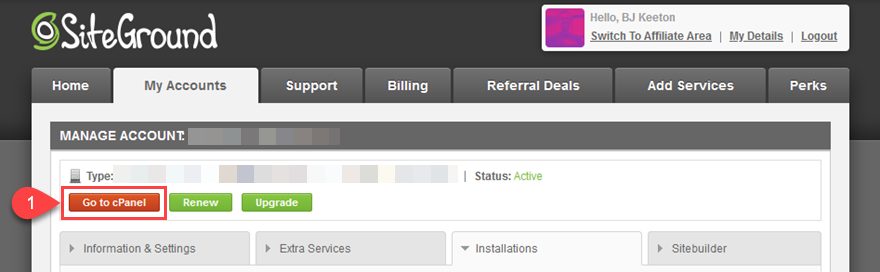
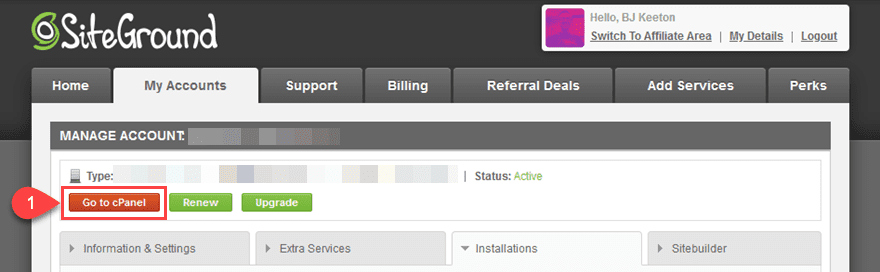
First, you need to navigate to your cPanel homepage. You should be able to find this in your user dashboard (or you might also have a direct URL to login). On SiteGround, for instance, the big, red Go to cPanel button is under the My Accounts tab.
The homepage of your cPanel will be a series of sections, each dedicated to a different part of your server maintenance and administration. You need to find the one labeled Domains. We tend to use CTRL/CMD-F to search for either domains or subdomains.
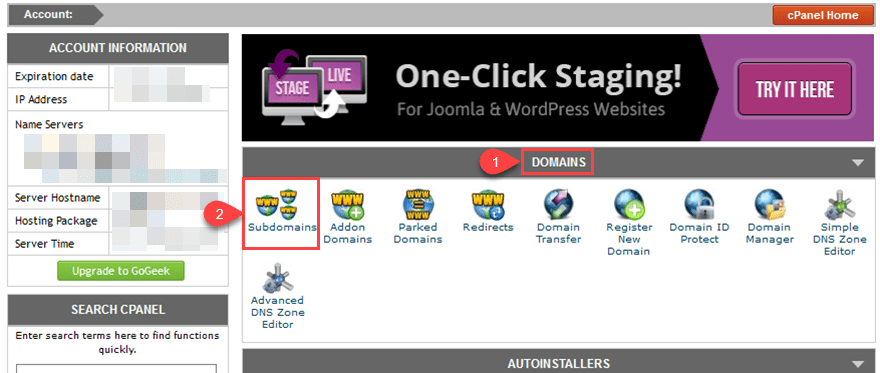
Click inside, and you will have a list of created subdomains at the bottom of the page (empty if you haven’t done this before), and a Create a Subdomain section at the top with a dropdown menu.
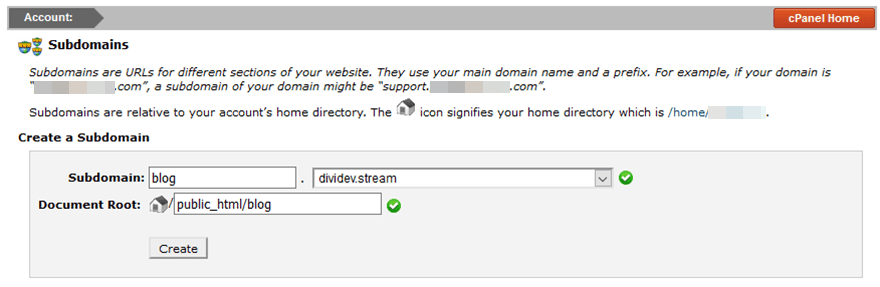
The dropdown menu will contain a list of any addon domains that you’ve added to your account. You can create a subdomain to any of these, not only the primary domain that hosts your cPanel. Simply fill in the form by picking your TLD and the prefix for the subdomain. The document root will automatically be filled out for you, but if you want to change it, feel free. Especially as this is a subdomain, you might feel want to create a more specific home folder for it.
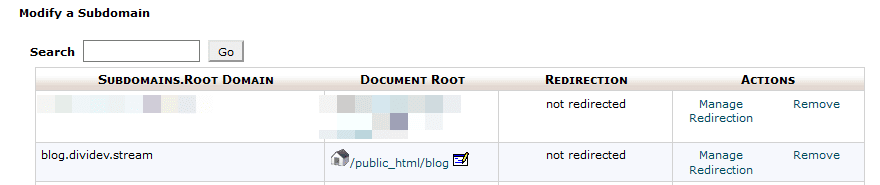
Hitting Create now has it in the list below, and you can treat it the same as you do any other domain in your cPanel, TLD or not.
Using a Subdomain with WordPress
Given that they’re separate websites in the eyes of both the server host and search engines, subdomains with WordPress give you a lot of freedom for how you structure your site. Subdirectories function in a very similar way to Pages or Posts, in that they’re children to your parent TLD (top-level domain, or your .com, etc.). These can have separate installations of WordPress, but because they’re children of the TLD, SEO and true separation and administration can get sticky. And over time, it can get downright complicated and frustrating.
Which is why the subdomain works so well, being essentially a separate website.
When Not to Use a Subdomain
There are a number of use cases where a subdomain is the perfect option for your site. There are also a number of cases where using a subdomain is not ideal. Such as landing pages, blogs, temporary/promotional, or static pages. You wouldn’t use a subdomain for any of these because they are constituent parts of your website. You want your primary TLD’s SEO link juice to be passed on to your About Me Page and to your Blog.
The same applies to any sales like Black Friday or Christmas pages that will only be used for a short period of time. You don’t want to have to start from scratch in getting that page to rank in the search engines.
When to Use a Subdomain
However, using a subdomain is fantastic when used properly. Sometimes, you don’t want the link juice transferred between your TLD and the subdomain.
A Login Page
While WordPress defaults to /wp-admin as its login, you can disable that and have a login.example.com, which is a quick and easy way to prevent some brute force attacks and malicious logins because it simply doesn’t show up in searches for your brand. It’s also a lot more memorable than /wp-admin.
Demo and Development Sites
You can use a subdomain with WordPress to create either a staging site, a development site, or a demo site. You sure wouldn’t want your standard organic traffic showing up there. If you set up a demo.example.com for a client with an unfinished feature, the last thing you want is for your regular users to find it and tinker with it and get put off. (Or to see information they shouldn’t have access to.)
Internal Blogs
An internal blog would also be great for a subdomain. If you have a company culture of professional development, you might have a professionaldevelopment.example.com that’s not meant for your users.
External Platforms
One of the top reasons to use a subdomain is to separate development from WordPress itself. Let’s say you run an ecommerce store on a non-WP platform such as Shopify. That store has nothing to do with the TLD’s installation of WordPress, but everything to do with your brand itself. The development team is potentially separate, with different bugs and workflows and project timelines. So setting up the Shopify store as a subdirectory here could be a little hacky. That’s why subdomains work so well. The two are linked by TLD, but separated as necessary.
And regarding SEO, you can always 301 redirect example.com/store to the store.example.com and keep things flowing smoothly in every direction.
Multiple Locations or Instances of the Brand
Finally, there’s WordPress.com’s example. It’s a WordPress multisite installation, actually. Each new user is given a subdomain off of WordPress.com like blogbysara.wordpress.com. In most other ways, they’re unrelated.
This principle can be applied to many brands, too. If you run a restaurant or store that has multiple locations, you may not want your Santa Fe store showing up with your Nashville location. Plus, there would be no reason for those users and staff to be working off the main site. WordCamp uses this strategy, splitting different Camp organization teams into subdomains with unique sites, SEO, users, and designs. The brand TLD unites them, but separate websites and teams aren’t jumbled together. Wires do not cross.
Wrapping Up
We hope this has cleared up some of the confusion about what a subdomain is and when you want to use it. The general rule is that you use a subdomain for specific reasons that need to be, for one reason or another separate from the main domain. It may be a store, a demo site, or even a series of separate locations. You can even use a subdomain for separate mobile sites with mobile specific content, though that trend is moving downward these days. Whatever you do, creating and using a subdomain with WordPress is a fairly painless and simple process. The reasons to use them are many, just make sure that you’ve considered what your website actually needs.
What have been the best uses you’ve found for subdomains on your WordPress websites?
Article featured image by Crystal Eye Studio / shutterstock.com
The post What is a Subdomain and How to Use One with WordPress? appeared first on Elegant Themes Blog.







