



Introducing The Most Extensive
Divi Options Update Ever
This is a huge update that adds tons of missing settings to all Divi modules, improves the Visual Builder interface and makes Divi easier to use.
Today we are excited to release an absolutely massive Divi update. It’s an update filled with tons of quality of life improvements, hundreds of new settings, great UI adjustments and more. We are calling it the Options Harmony version 2 release, and it’s an important step towards an even more user-friendly and cohesive building experience. This update is huge, so sit back, relax and let’s get into the details.

Hundreds Of New Options And Improved Responsive Editing And Hover Editing
We went through every module and added new design options, expanded responsive editing and hover editing capabilities, harmonized the available options between different options groups and between parent and child modules.
Options Harmony Between Option Groups
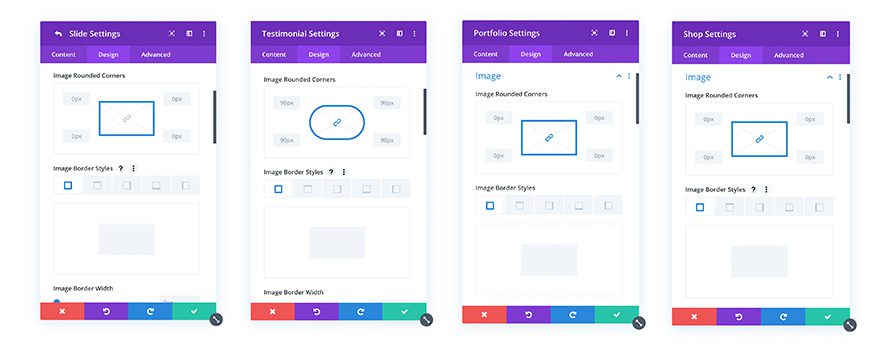
We went through the option groups in all Divi modules and made sure that each had the same full set of options. Where options were missing, we filled in the gaps. Not only does this add tons of new design settings to Divi, it also improves consistency between modules and avoids the frustration of not having the option list you are expecting when bouncing between different modules.
Full Text Settings For All Modules
The full range of text editing options have been added to all modules. These were previously only available for text modules, but they can now be found in any modules that has text content. These new additions include dozens of new options for editing anchor links, lists and block quotes.
New Image Options
All image option groups now have the full range of image design options that were previously only available in the image module and other select modules. These new additions include border radius, border, box shadow and filter options.
New Button And Field Options
Any module that contains input fields or button elements now has new padding and margin options that you can use to adjust the spacing of the sub element. This means that you can fully style buttons within sliders and contact forms in the same way that you can style them in the individual button module. In the past, the lack of spacing options lead to design inconsistency.
Options Harmony Between Parent & Child Modules
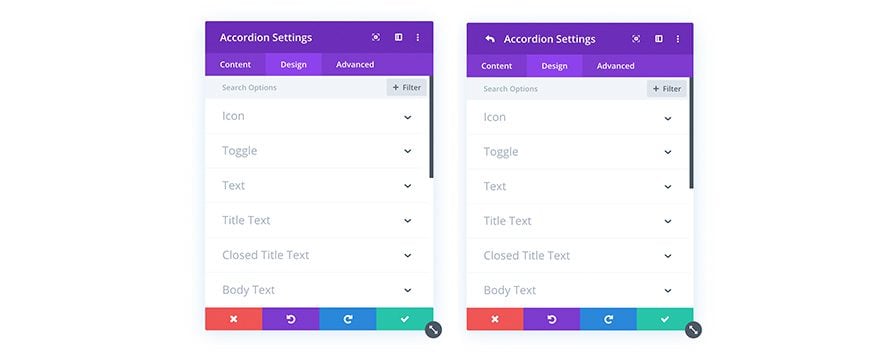
Not only have we added tons of new options to existing option groups, we have also harmonized the available options with parent and child modules so that when you customize a sub element, like a slider slide or a tab within a tabs module, you will always get the same set of design options for both the parent element and the child element. This means that a lot of new design settings are now available for sub elements that were previously missing.
Responsive Editing For All Options!
In addition, and this is probably the most exciting options related change, we have added Responsive Editing to every single design setting in every single Divi module. In the past, responsive editing was only available for certain options, and the lack of responsive editing for particular settings was somewhat arbitrary and unexpected. Today we are bringing responsive editing to hundreds of new settings, giving you even more control over the appearance of your design on every device.
More Hover Editing Options

Important Interface & User Experience Improvements For the Visual Builder
This update ships with some important quality of life improvements and user interface enhancements that bring to the forefront some of Divi’s most powerful features.
Helpful Hints For Every Option
Next, we went through every single option in every single module, and made sure that each setting was accompanied by useful help text. In the past, we only added helpful hints to certain options that we thought might be confusing, but where we drew the line was subjective. Now, no matter what option you are using, you can always click the help icon for a full explanation about how the setting works.
No More Missing Translations
Another point of imbalance within Divi that we are addressing in this update are missing translations. Every time new features were added, or every time something was changed, new untranslated strings were added to the builder and we were forced to play catch up. We were never fast enough, and the result for non English users was a builder that was mostly translated, but still had English words mixed in here and there. We are fixing this today by automating translation using Google Translate. Every time Divi is updated, our production release task will search for missing translations and fill in the gaps automatically. While Google Translate isn’t perfect, it’s still a big improvement and you can always disable translations within the Divi Theme Options if you prefer to build in English.
Easier Access To Powerful Features
Finally, this update also comes with a very important UI improvement that brings to the forefront some of Divi’s most powerful features, making them easier to access for everyone. Throughout Divi you will see a new triple dot settings icon that can be clicked to access all available options and actions for that item. Within this menu can be found important features, like Copy Paste, Copy Paste Styles, Find And Replace, and Extend Styles. These actions can be performed on many different levels that you may not have been aware of, and you will now find them at the parent module level, at the option group level, and at the individual option level. If you aren’t using these awesome features, you are really missing out! Oh, and we also added the Divi Color Manager to background color options.
Options Harmony version 2 is available today, so download Divi and take it for a spin. Let us know what you think in the comments and don’t forget to check back next week for even more great Divi features coming your way.

Join, Renew & Upgrade Today For 10% Off!
Join the most enthusiastic and loving WordPress theme community on the web and download Divi 3.0 today. Using the new Visual Builder, you can build websites faster than ever before with its incredibly fast and intuitive visual interface. You have to see it to believe it!
Join Today For 10% OFF!
Renew Your Account Today For 10% OFF!
Upgrade Your Account Today For 10% OFF!
The post Hundreds Of New Divi Design Options Plus Brand New Interface Enhancements For The Visual Builder appeared first on Elegant Themes Blog.







